Giới thiệu phần mềm SIEM mã nguồn mở WAZUH
Tổng quan về các khái niệm LMS, SEM, SIM, SEC, SIEM và Wazuh – nền tảng SIEM mã nguồn mở fork từ OSSEC: kiến trúc, cấu hình agent, FIM, phân tích log, phát hiện lỗ hổng, rootcheck và tuân thủ PCI DSS, GDPR, HIPAA.
Overview
- LMS “Log Management System” – a system that collects and stores log files (from operating systems, applications, etc.) from multiple hosts and systems into a single location, allowing centralized access to logs instead of accessing them on each system individually.
- SLM/SEM “Security Log/Event Management” – an LMS, but marketed towards security analysts instead of system administrators. SEM is about highlighting log entries that are more significant to security than others.
- SIM “Security Information Management” – an asset management system with features to incorporate security information too. Hosts may have vulnerability reports listed in their summaries, and intrusion detection and antivirus alerts may be shown mapped to the systems involved.
- SEC “Security Event Correlation” – to a particular piece of software, three failed login attempts to the same user account from three different clients are just three lines in its log file. To an analyst, that is a peculiar sequence of events worthy of investigation, and log correlation (looking for patterns in log files) is a way to raise alerts when these things happen.
- SIEM “Security Information and Event Management” – the “all of the above” option. As the technologies above merged into single products, SIEM became the generalized term for managing information generated from security controls and infrastructure. We’ll use the term SIEM for the rest of this post.
What is Wazuh?
Wazuh is an open source project that provides security visibility, compliance and infrastructure monitoring capabilities. The project was born as a fork of OSSEC HIDS and has evolved into a comprehensive solution by implementing new functionalities and integrating additional tools like OpenSCAP and Elasticsearch.
Why choose Wazuh?
- Open source and free
- Forked from OSSEC
- Ready to use
- Scalable
- Integrates with other platforms
- Easy migration from existing OSSEC deployments
Where to use Wazuh?
- Cloud and on-premise environments
How to use Wazuh?
- Install an agent on the target machine
- Agentless monitoring (via SSH, Syslog, API)
Wazuh features

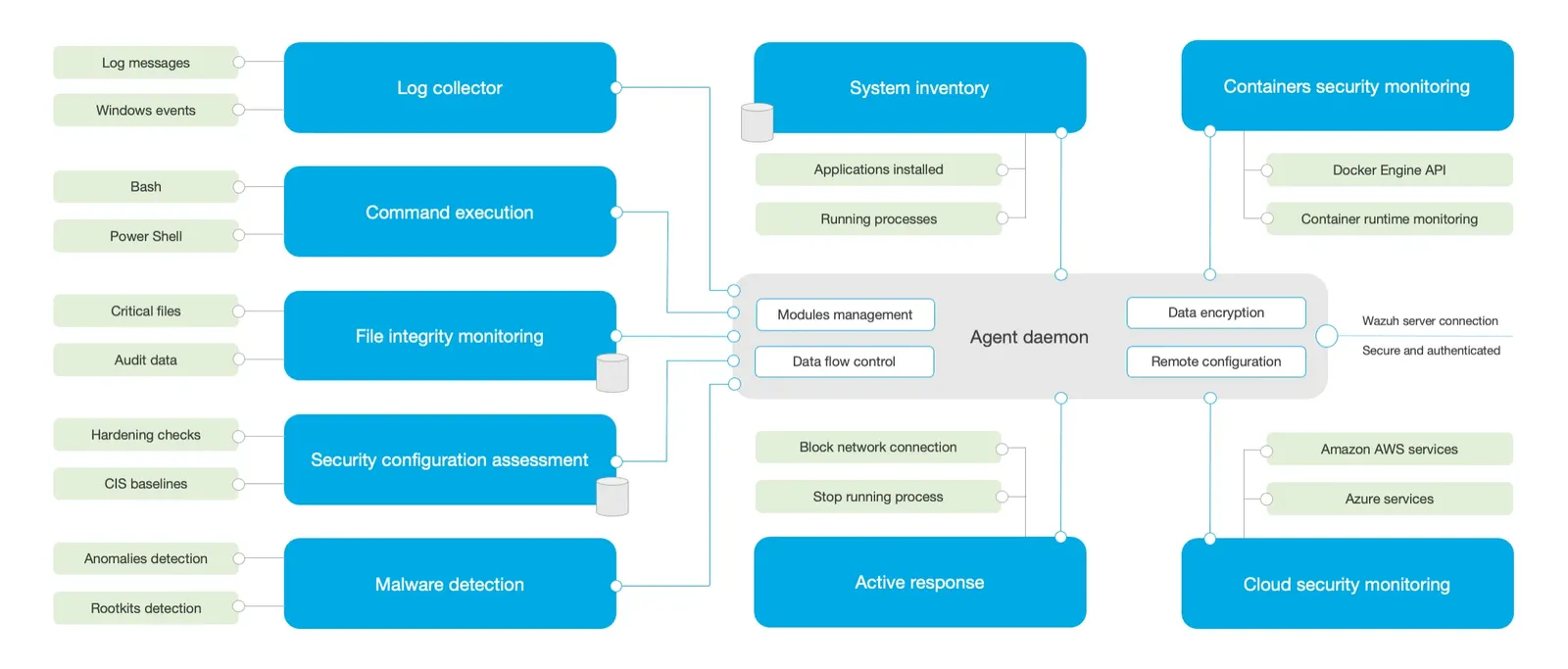
- Inventory
- Security compliance
- File integrity monitoring
- Audit who-data
- Log collection
- Command monitoring
- Vulnerability detection
- Anomaly and malware detection
Architecture
Installation
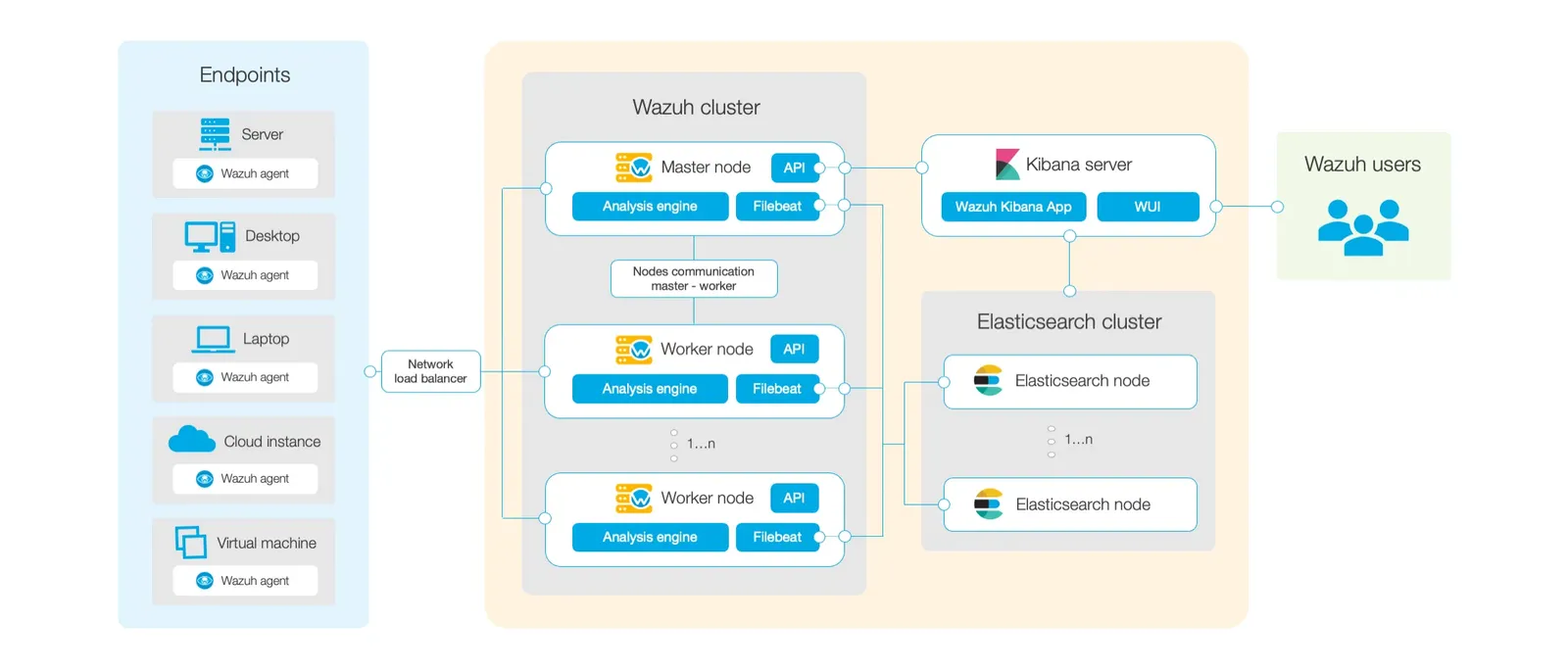
- All-in-one deployment (single node)
- Distributed deployment (multiple nodes)
Agent configuration
- Locally:
ossec.conffile on each agent - Centralized:
agent.conffile, managed on the Wazuh manager and shared to agent groups
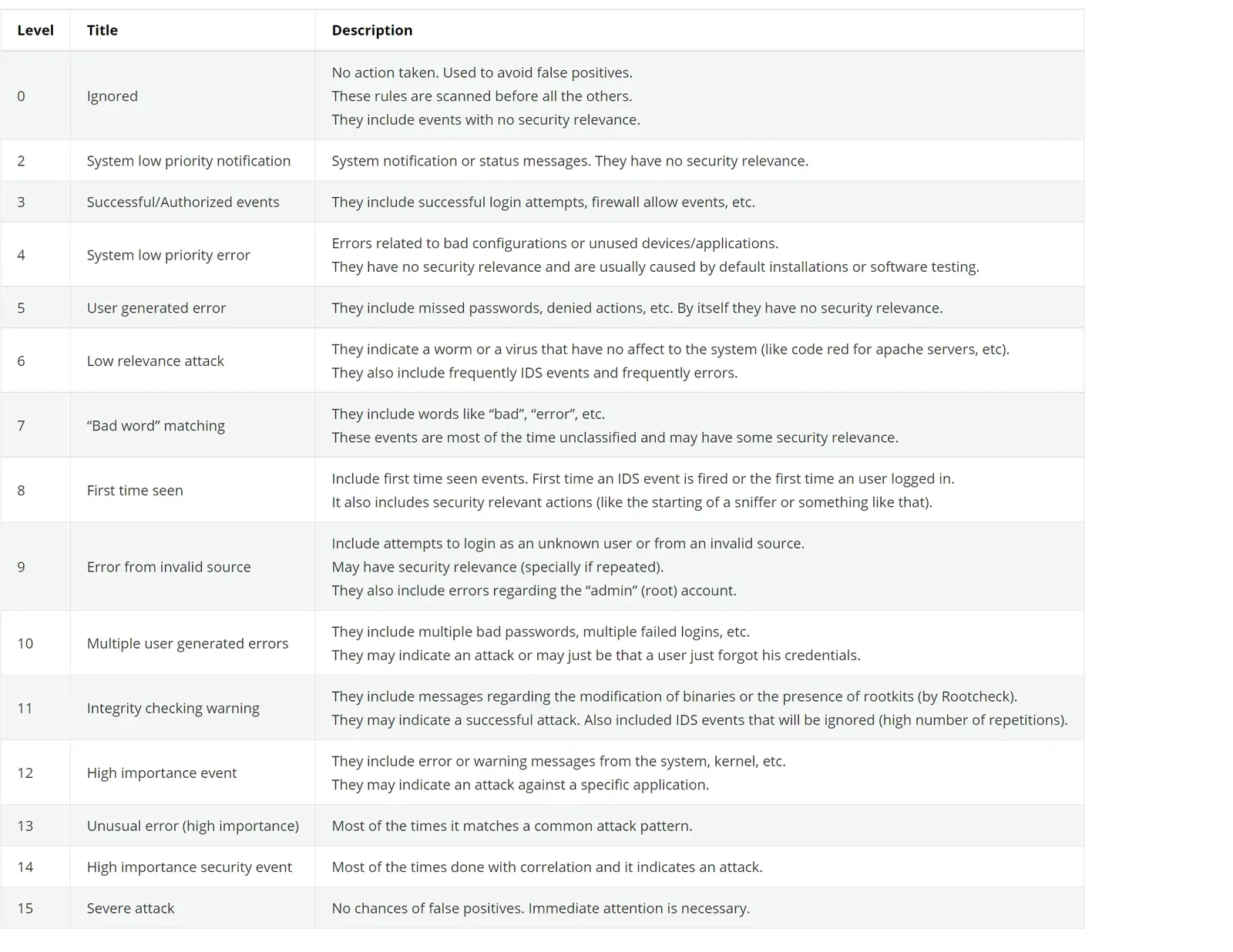
Alert rule levels
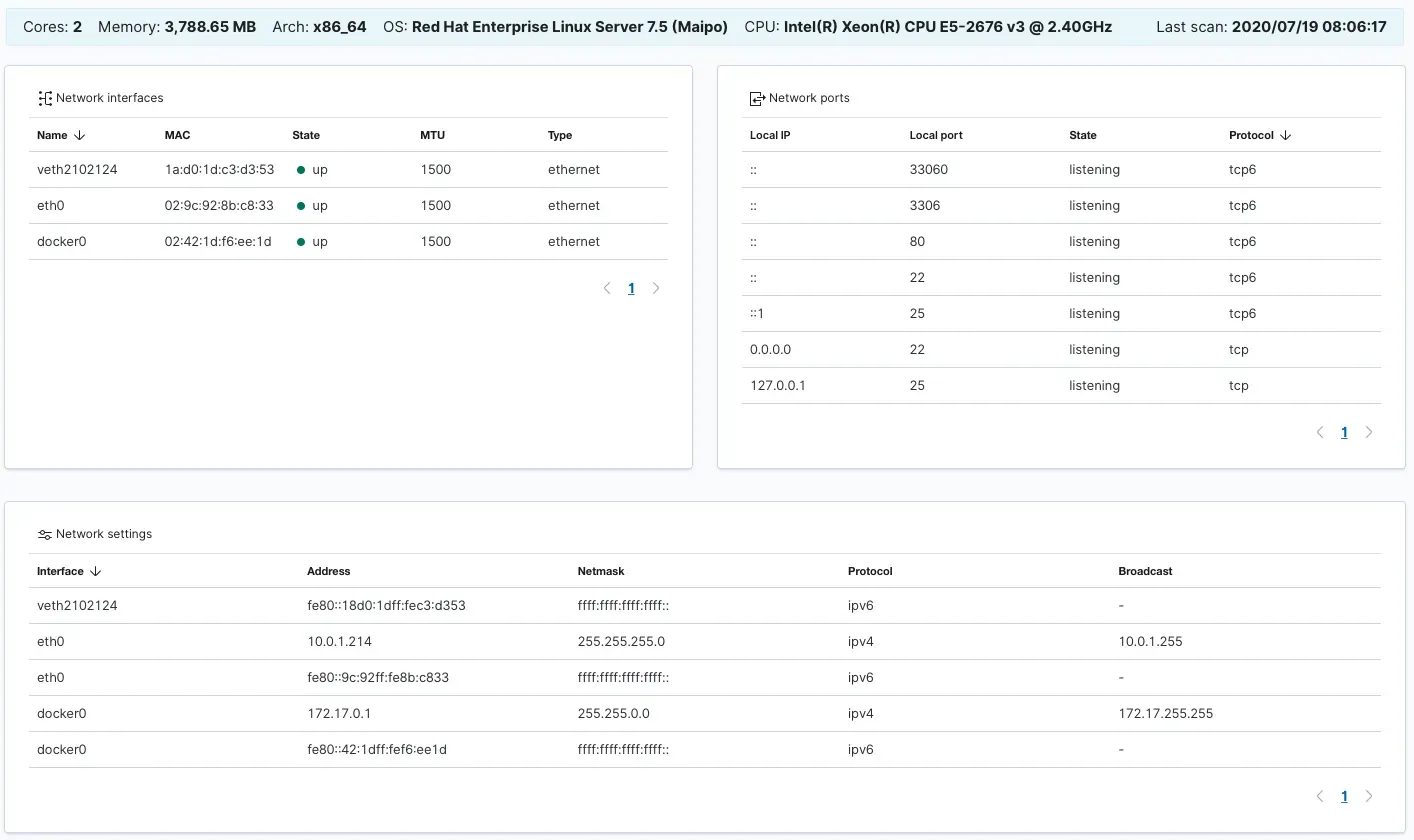
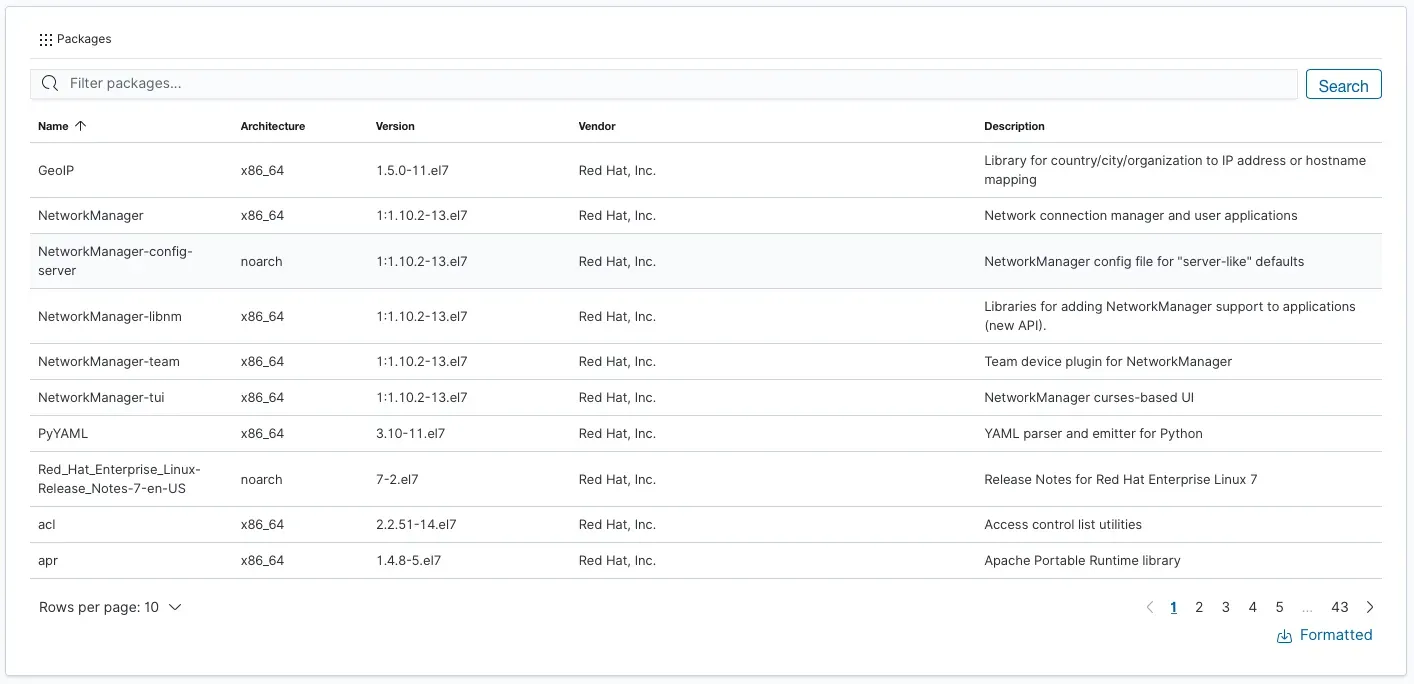
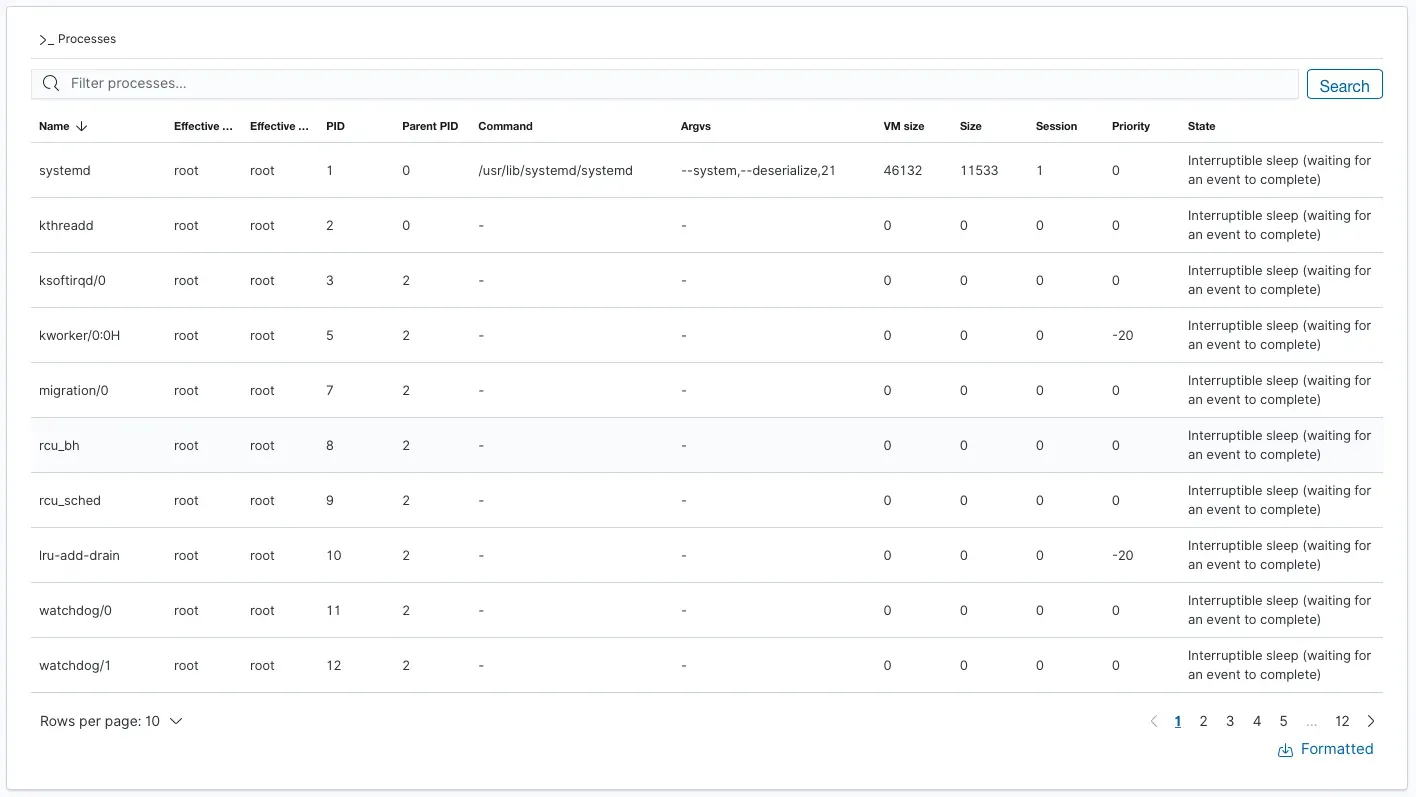
System inventory
The agent collects system information from each endpoint:
- Operating system
- Memory
- CPU
- Network interfaces
- Open ports
- Installed packages
- Running processes
File integrity monitoring
What is file integrity monitoring?
File integrity monitoring (FIM) is the process of protecting files from unauthorized changes, including cyber-attacks.
How does it work?
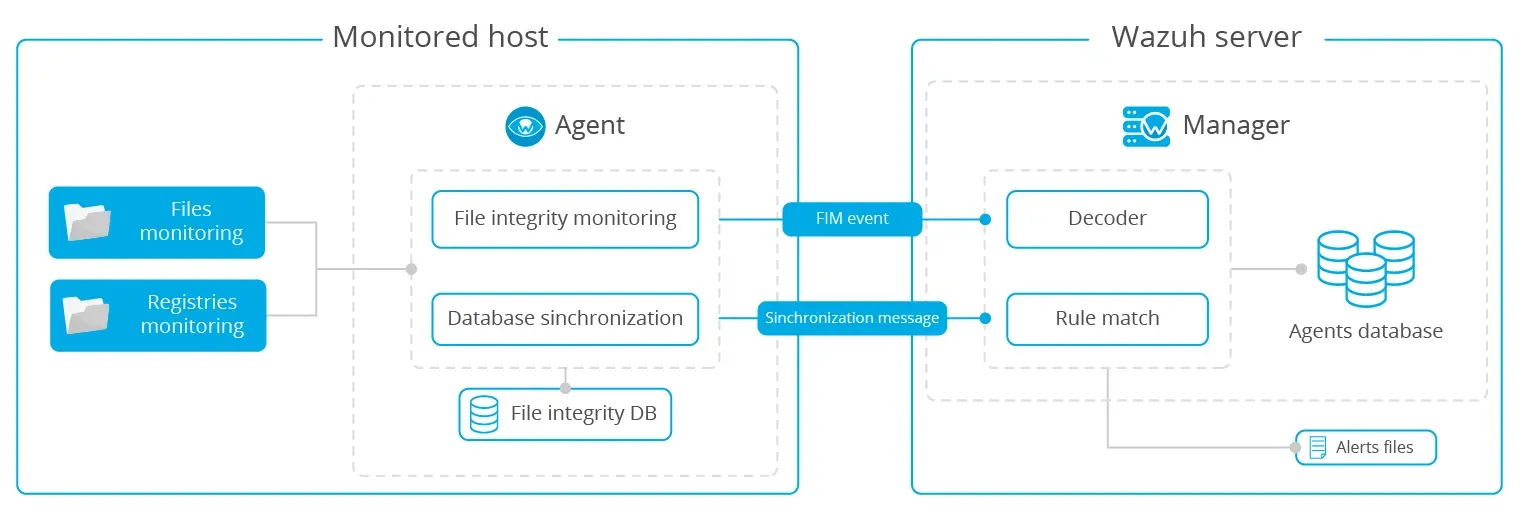
The FIM module runs in the Wazuh agent. It periodically scans the system and stores the checksums and attributes of the monitored files and Windows registry keys in a local FIM database. It detects modifications by comparing the new checksums to the old ones, and reports every detected change to the Wazuh manager.
Use cases
- Real-time monitoring of file and directory changes
- Monitoring changes to critical or sensitive files and directories (private/public keys, configuration files, Windows Registry)
- Auditing who-data (who changed what, and with which process)
Log analysis
What is log analysis?
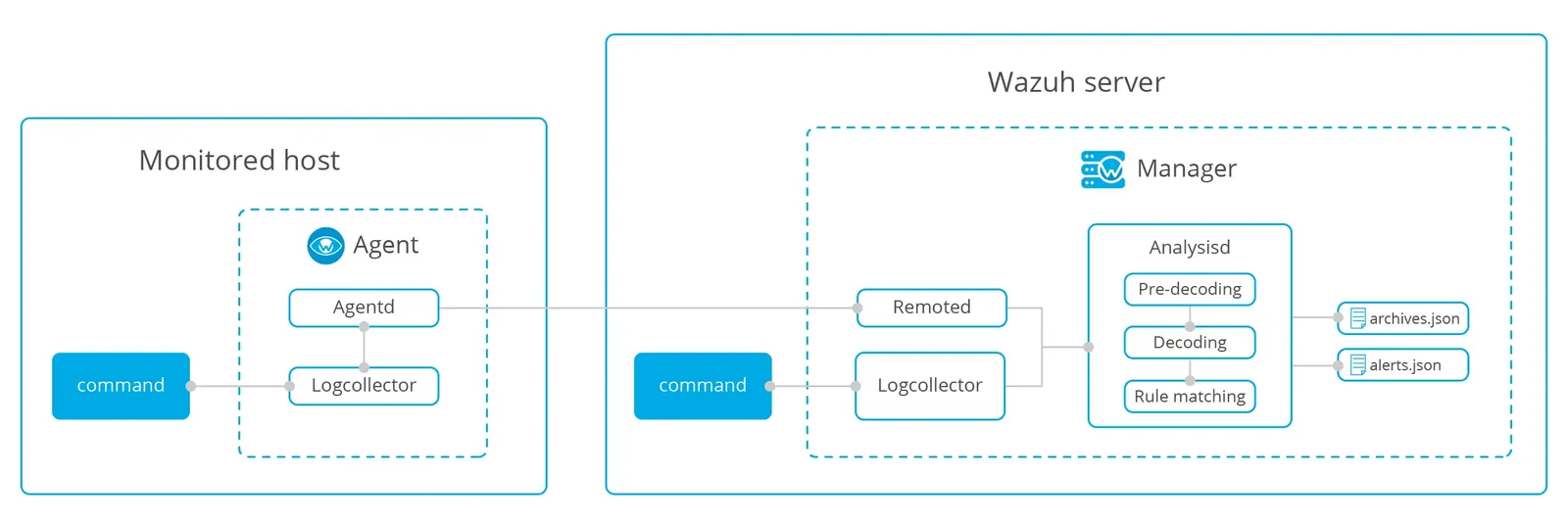
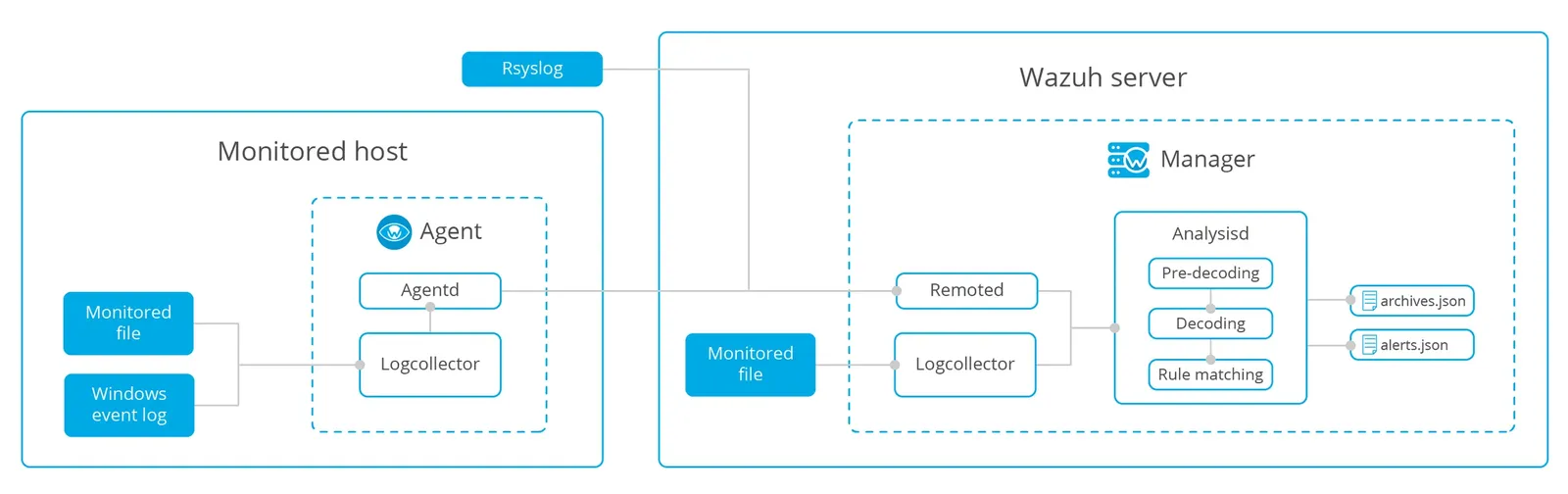
Log analysis collects log data from local log files (OS and application logs), Windows Event Logs, and network devices via the syslog protocol. Wazuh then decodes the raw logs and analyzes them against its rules.
How does it work?
Security compliance
The Wazuh platform is often used to meet the technical aspects of regulatory compliance standards. Wazuh not only provides the necessary security controls (intrusion detection, configuration assessment, log analysis, vulnerability detection, among others) to meet compliance requirements, but also uses its SIEM capabilities to centralize, analyze and enrich security data.
To support regulatory compliance, the Wazuh rules have been carefully mapped against compliance requirements. When an alert is generated (a rule condition has been matched), it automatically includes compliance information. Currently supported standards:
- Payment Card Industry Data Security Standard (PCI DSS)
- General Data Protection Regulation (GDPR)
- NIST Special Publication 800-53 (NIST 800-53)
- Good Practice Guide 13 (GPG13)
- Trust Services Criteria (TSC SOC2)
- Health Insurance Portability and Accountability Act (HIPAA)
Vulnerability detection
Vulnerable software applications are commonly targeted by attackers to compromise endpoints and gain a persistent presence on targeted networks. Relying on its software inventory capabilities, Wazuh maintains an up-to-date list of all applications installed on endpoints running the Wazuh agent. By correlating this information with the National Vulnerability Database (NVD) and data collected from operating system vendors, Wazuh identifies vulnerable applications and produces risk reports.
To detect vulnerable software, Wazuh uses a CVE (Common Vulnerabilities and Exposures) database built automatically from the following sources:
- CVEs for Ubuntu Linux distributions
- CVEs for Red Hat and CentOS Linux distributions
- CVEs for Debian Linux distributions
- CVEs from the National Vulnerability Database
- Microsoft Security Response Center
How does it work?
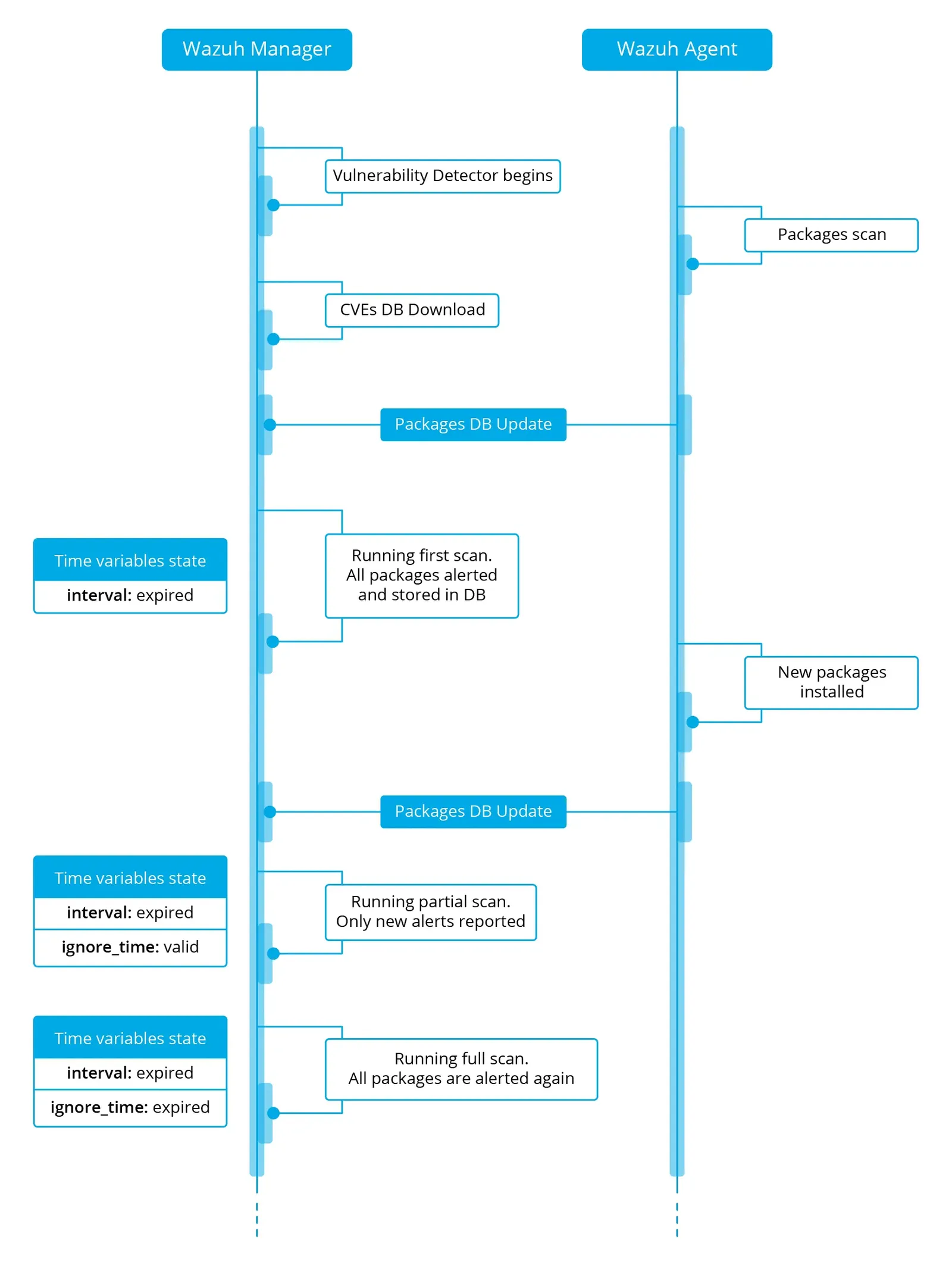
Required component: syscollector
Anomaly and malware detection
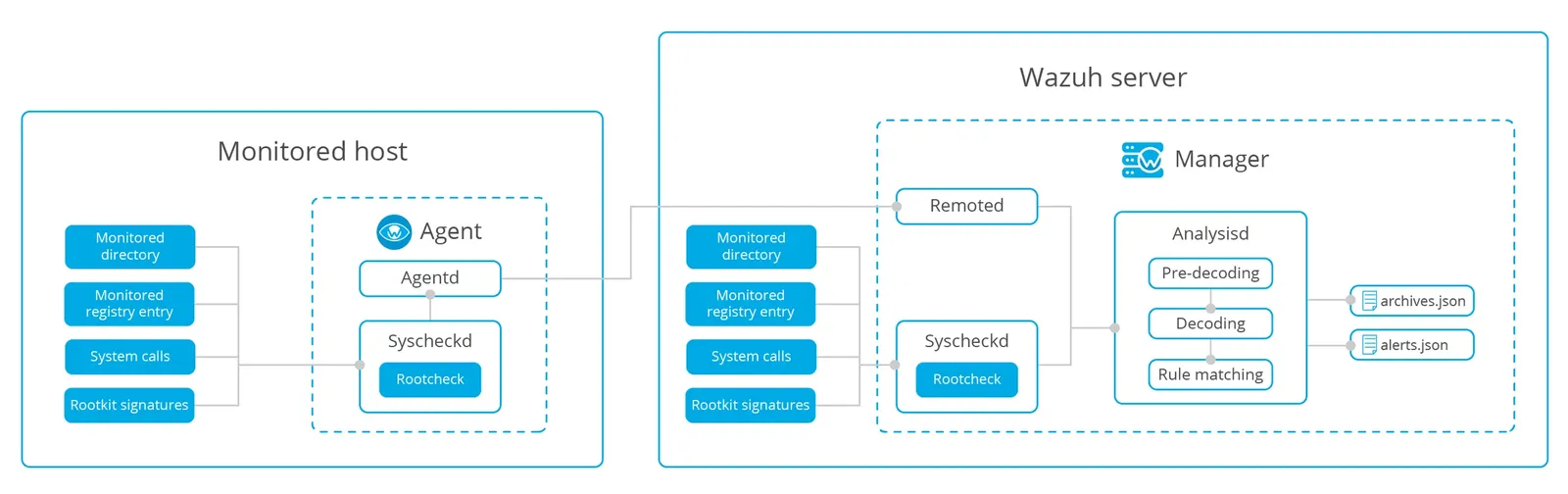
Anomaly detection refers to finding patterns in the system that do not match the expected behavior. Once malware (e.g., a rootkit) is installed on a system, it modifies the system to hide itself from the user.
The main component responsible for this task is rootcheck, although syscheck also plays an important role.
How does it work?
Command monitoring
There are times when you may want to monitor things that are not in the logs. To address this, Wazuh can monitor the output of specific commands and treat that output as though it were log file content.
How does it work?